
Windows 7: How to Adjust System Restore Space
By: Arie SlobWindows Seven - like earlier Windows versions - includes System Restore, that automatically backs up registry and system files (into a "e;Restore Point"e;) whenever you install new software or drivers.
Like its predecessor, Windows 7 allocates 15% of a hard drive's space (for hard drives over 1GB) for system restore storage. In Windows Vista the space used for System Restore and Shadow Copy can't be configured from within the Graphical User Interface (GUI).
- Click Start button and type cmd in Search programs and files box
- Right click on cmd.exe listed at the top of the Start menu and click Run as administrator
- In the command prompt type cd %userprofile%/Desktop and press Enter
-
Next type powercfg -energy in the command prompt and press Enter
powercfg will enable a trace for 60 seconds. If you want to use it for more information than just the battery details, make sure no other processes are running during that time
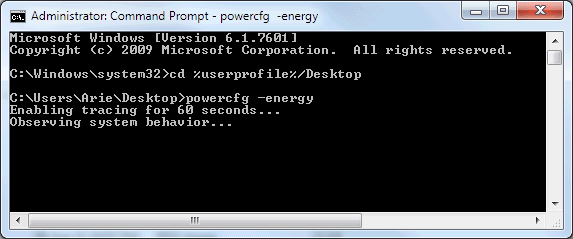
When finished, powercfg will generate a report (in html format) which shows errors, warnings etc. Since we directed the command prompt to your desktop, the report will be placed on your desktop as energy-report.html. Just open the report in your web browser & scroll down to the Battery Information section.
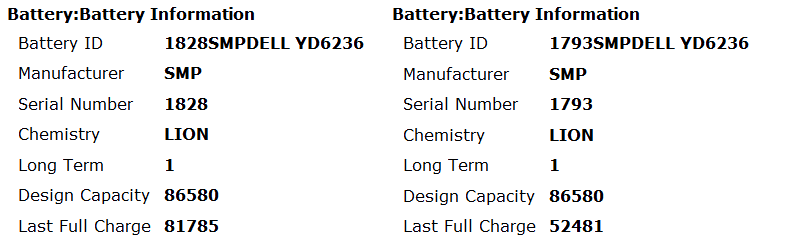
Above are two samples. On the left is a relatively new battery (a few months old). As you can see, the last full charge is only some 5.5% below the design capacity.
On the right is an old battery (around 4 years old) which shows that the last full charge was nearly 40% below the design capacity. From experience I know that this battery will only last a few months more. I've had a battery fail a few months after it tested 45% below its design capacity. I recently did a 'stress test' on this battery (which will show you the minimum time you can expect while running the laptop at 'full power'), and it only managed 36 minutes. Compare that with 125 minutes for the new battery.
For additional information on Lithium-ion batteries read How to Prolong Lithium-based Batteries